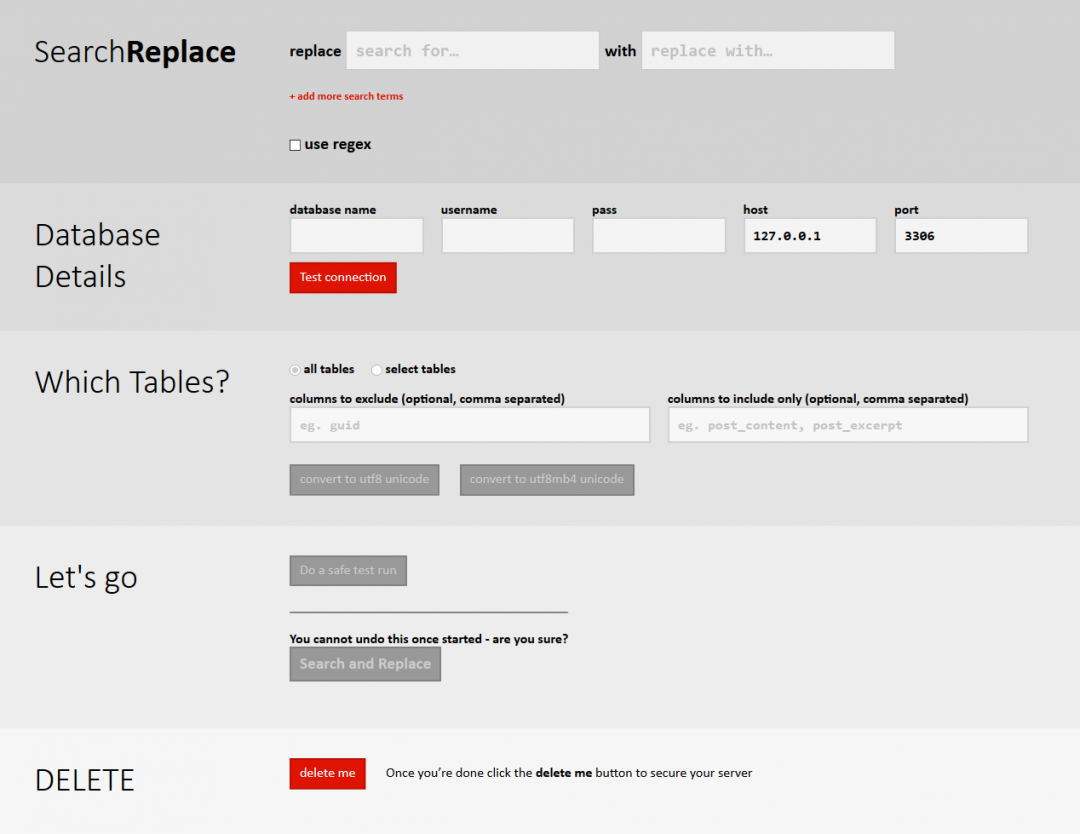
When you’re migrating WordPress (or any other platform using serialized PHP strings in the database) between domains, you must use a safe search and replace method that preserves the integrity of the serialized string lengths. A simple of a dump file for http://localhost to, for example, http://thenewdomain.com is problematic because the length of the string changes but the indexes for the serialized strings does not. Consequently settings are lost and widgets disappear. Not good.
This script can now also handle multiply nested serializations, which can happen in transient values in WP at times, and it can also handle multi-byte Unicode changes safely. This is important now that internationalised domain names are allowed.
It’s Not Only for WordPress
It’s worth mentioning that the code will work for any platform that stores PHP serialized arrays in a MySQL database. You can easily use this script on Drupal, Joomla and many other systems where you need to change items across a database without messing up your stored arrays.
Download Search Replace DB v 2.1.0
Installation & Use
To use the script, you should install it in the root folder of your WordPress install (if you wish it to automatically pick up your wp-config) or anywhere else you fancy, but you won’t get the automatic config. You should also, to protect yourself from automated scanners looking for this script, rename it first. eg, you could name it as rrrrreplace.php – you’d then visit a url like http://example.com/rrrrreplace.php and follow the on-screen instructions from there.
What you absolutely, 100% certainly MUST do is to delete the script once you’ve finished. If somebody chances on it they can do anything to your database – and that wouldn’t be nice, would it?
If you’re using the script with systems such as Drupal or Joomla, everything should work, but we haven’t added any code to pick up on your config. You may also have issues with Drupal blobs, in which case you should head on over to GIT (see link below) to grab the development copy which has handling for this included – feedback would be helpful, thank you.
Contribute!
A lot of developers now use this plugin. If you feel you can add something, there is now an official Github repository for this script at https://github.com/interconnectit/Search-Replace-DB
Version 2.1.0 (released Dec 2011) Improvements
The latest version 2.1.0 introduced a number of key improvements:
- Added charset support, helping in all sorts of places (thanks Sergey Biryukov!)
- Added option to skip guid column for migrating already live sites
- Removed use of deprecated functions.
- Other bug & comment fixes
Changes being prepared for Version 2.2.0
- Support for BLOBS/Objects to give Drupal compatibility
- Minor tweaks and corrections
github Repo – DRUPAL devs please test master branch!
To see how you can use this tool to aid migrations, check out our article on WordPress migrations or visit the WP Tuts+ article that mentions this script.
If you are in any doubt whatsoever about how to use this standalone script, then please consider getting an expert in. It’s a really powerful bit of code that if used badly can damage a WP install beyond repair. If you want help, get in somebody like us, for example, or any of the other great guys listed over at CodePoet.
IMPORTANT: This code is supplied with no warranty or support implied. You use it entirely at your own risk. Currently it is supplied under the WTFPL but this will change to the GPL eventually. And when you’ve finished using the script, PLEASE delete it as it can pose a serious security risk to your site.
Download Search Replace DB v 2.1.0
Changelog:
// Version 2.1.0:
// – Changed to version 2.1.0
// * Following change by Sergey Biryukov – merged in and tested by Dave Coveney
// – Added Charset Support (tested with UTF-8, not tested on other charsets)
// * Following changes implemented by James Whitehead with thanks to all the commenters and feedback given!
// – Removed PHP warnings if you go to step 3+ without DB details.
// – Added options to skip changing the guid column. If there are other
// columns that need excluding you can add them to the $exclude_cols global
// array. May choose to add another option to the table select page to let
// you add to this array from the front end.
// – Minor tweak to label styling.
// – Added comments to each of the functions.
// – Removed a dead param from icit_srdb_replacer
// Version 2.0.0 – returned to using unserialize function to check if string is serialized or not
// – marked is_serialized_string function as deprecated
// – changed form order to improve usability and make use on multisites a bit less scary
// – changed to version 2, as really should have done when the UI was introduced
// – added a recursive array walker to deal with serialized strings being stored in serialized strings. Yes, really.
// – changes by James R Whitehead (kudos for recursive walker) and David Coveney 2011-08-26
// Version 1.0.2 – typos corrected, button text tweak – David Coveney / Robert O’Rourke
// Version 1.0.1 – styling and form added by James R Whitehead
// Version 1.0.0 – original version by David Coveney
To Be Done
Ensure UTF8 encoding is enforced (see comments). Added in v2.1.0
Self deletion or security system to prevent accidental security risks.
Release CLI version for use on non-WP sites, or for other purposes (already supports use on any MySQL DB.)
Change to GPL V3.
Eliminate warnings and remove deprecated function calls. Added in v2.1.0
Add facility to subscribe to interconnect/it Newsletter.
Download Search Replace DB v 2.1.0
Donations
We’ve been asked a lot in the comments box below about accepting donations. But you can’t believe what a headache that is from an accounting and tax perspective.
Consequently all we can say is that if you wish to you can buy a personal gift for the key developers from one of the wishlists below – especially given that it’s a spare time project. If others who have contributed wish to provide us their wishlist links then we’d be more than happy to add them.
David Coveney is the project lead.
James Whitehead added the nice UI.
Robert O’Rourke gave us the branding and has made tweaks.

by
What a life saver. I was going crazy trying to update my new URL structure in thousands of entries with my text editors find/replace. I finally realized I was using serialized arrays for most of my WordPress post meta and was destroying my data by only replacing the string and not updating the length. A quick Google search and this script saved me a major headache and a lot of time.
Thank you – this script was very useful as I was trying to migrate a WordPress site – “normal” search and replace wasn’t working for me and this script helped fix the problem (and saved me from having to manually dig through a lengthy file).
Note – Paul is correct -there is a typo in your warning message.
“And if you’re English is bad and you don’t fully understand the instructions then STOP. Right there. Yes. Before you do any damage.”
“you’re English” should be “your English.”
Oops! How ironic… Pedantry points to you Stacy! Thanks for letting us know.
[...] WordPress Serialized PHP Search Replace Tool: [...]
The script did work for my Drupal website, but caused other weird problems. Some of my pages went blank, and links on the homepage were missing.
I would say that this script is generally not applicable to Drupal-based websites.
Just sharing my experience for the benefit of other Drupal fans.
Hi Jaspal – Drupal also stores things as Blobs, which need further decoding. A patch has been submitted and we’ll soon release a Beta version 2.2 which should work fine on Drupal installs. The problem is we’re a WordPress shop so we’ll need partners to help test the Drupal changes. I might be in touch!
If you can try out the master version on github at https://github.com/interconnectit/Search-Replace-DB it would be hugely appreciated – this should hopefully fix the Drupal issue you’ve had.
Hey there, I ran into an error when executing this on a large database. I believe the DB weighs in at 500MB as a text file. Can the script handle large databases?
Large databases shouldn’t be an issue except with respect to time-outs. It will run through most in seconds. We regularly use the script on large scale sites with no difficulties, but we haven’t done any testing to say what does and doesn’t work. Can you give more detail about what happens?
Hi David, if I remember correctly, I got an Error 500 running the script on the entire database I mentioned. It worked great when I ran it on each table individually! There is one table that it errors out on though, wp_ak_404_log, which, I hesitate to say, is worth almost 400,000 records. Thanks for your generosity in building this, it has done much good.
there are some depreciated functions but just remove notification errors. Works beautifully! Thanks
Hi Ryan – there shouldn’t be any deprecated functions any more (we had a clean-up recently) – are you running the latest version?
amazing stuff, much appreciated!
searched in the comments but haven’t found anything about “line breaks”
i mean, i tried to search a block of Html lines… and no matches are found
tried to change the input text with a textarea (srch and rplc), but nothing…
any hints?
Thanks Rudolf. With respect to line breaks – I take it you don’t mean
tags but line breaks within longtext fields? If that’s the case I’m afraid we haven’t tried – the tool was always designed as a migration tool rather than an absolute search and replace tool so there’s likely to be some limitations. Try searching for \r or \n and see what happens and let us know.
hi David, thank you, again, for such useful tool
Yes, I’m referring to longtext strings.
And just tried to search for the exact string that appears in a mysql dump (single line, with \r\n as line breaks), but it doesn’t work.
Feature request: I miss the option “Search again” (reusing DB Details and selected tables)
To do the search again you can simply click the back button on your browser – the values should remain selected. Or is this not the case for you?
Dude!!! You guys are the most awesome of the awesome! I’ve been trying for 2 weeks to get my WPMU site up from local to live server. I tinkered with your instructions for 20 minutes and my life is complete!
I just got a new job and was trying to finish up a client site before I leave. With your help, I’ll be getting paid. Looks like you guys have another satisfied user who would love to make a contribution to your development efforts.
Thanks a million.
Thanks so much for this!
Actually, after looking at this a bit more, it looks like it works fine for BLOBS, just not for serialized data that contains Objects. Any way this can be incorporated into a newer version? Does anyone have a solution that I can use for this?
Thanks bunches.
I’m finding that this script does not work with BLOB fields. Any ideas on what I can do to get it to work with them? Drupal 7 has a lot of BLOB fields that contain serialized data.
Thanks bunches.
Wow. This is an incredible script. Helped with with my WordPress site. Any place for me to send a small donation?
Thank you!
Hi Ted, thanks for the good words!
We don’t really have a way of accepting donations for this code at the moment, I’m afraid. You could always buy one of the devs something from the list shown in the message before, but it’s really not necessary
Bro, your software worked like a champ!
Hi Dave & Team,
Excellent piece of script here. You’ll have really saved me a lot of time and headache. I came across your page only after i realized that the widgets were not getting properly imported across domains and googled the net for solutions.
Wish i had come across your site earlier.
Thanks big time
Regards
Prashanth D’Silva
I am a big fan of this tool which constantly saves me lots of time. I LOVE it but please allow me a few minor critiques. I was hoping with the new 2.1 version that the multiple annoying ‘are you sure’ questions were removed (I use the tool _every day_), I don’t find the new features particularly useful (for me), and how come the first page still says v2.0. Looking forward to a more compact interface of this amazing script (a separate readme with all the warnings would be plenty). Thank you so much!
Hi David,
your latest update to 2.1.0 fixed my problem moving cforms related settings. Is it possible to donate you guys some money for the excellent work?
Also, for our deployment scripts we would need a command line version of this script. Do you have any plans to develop one? The databases connection settings and the strings to be replaced could be placed into a simple configuration file.
Hi Hakan – thanks!
It’s not possible to donate through the interconnect/it site at the moment as we’re trying to work out the tax and accounting implications for the company (it gets complex!) so the only thing I suggest is that you can send a personal gift to any of the developers involved using their Amazon Wish Lists:
James Whitehead’s: http://www.amazon.co.uk/registry/wishlist/1CWUCTVKCZSFP
Robert O’Rourke’s: http://www.amazon.co.uk/registry/wishlist/1EWBGC8Z5LCYF
David Coveney’s: http://www.amazon.co.uk/registry/wishlist/1I2TQ9F0U0MG0
All in various states of maintenance, but we’re encouraging James to put things on his!
We’ll sort out some kind of contributor’s page in due course so anybody can be thanked.
forgot – it’s wordpress (3.2.1)
Didn’t work for me – I get 403 forbidden on step 5, i.e. when I press “Submit Search string” on step 4.
(I’m trying to update from temp url to domain, i.e. from http://someip/~accountname to http://mydomain.com
And you messed up version numbers – at the top of the header it’s 2.0.1, release history does include 2.1.0 and the page (gui) says 2.0.0
I’m not sure why you’d get a 403 error on that – should just work, and indeed does on every web server we’ve tested it on.
Could you post some details about your webserver, perhaps? Along with PHP version, mySQL version, etc.
Thanks a lot! It took me a while, but eventually I figured that the problem was with the serialized database entries.
Your tool saved me tons of time. This should really be part of the standard WordPress installation.
Your code just saved my ass!
I spent ALL DAY trying to get my new site running like the old one. I thought it was my upload speed screwing the database transfer until I came across his little script. I’d been using text edit with find/replace until now. It had been working fine, but I think the latest plugins I added to the site caused big problems. Your little plugin solved them. Can’t thank you enough. I want to marry you and have your babies!
:O)
Your script has saved my life yet again
Thanks!
Just wanted to say how much I love this script. Huge time saver for me. I use it to help clone my WordPress sites. I used to do a search and replace on the database in Notepad++ but of course that never got everything and I’d lose widgets and some other things. But with your script it works like a charm and I can clone a site to a new domain in a few minutes. Brilliant!
Thanks Dave,
This proved very helpful for migrating a development environment from MAMP Pro on OS X to a staging server.
Dave,
I really appreciate this tool, but I was curious when you plan on releasing the next version?
Thanks,
James
Hi James – as you’ll see, we’ve now released version 2.1.0 – it fixes a lot of things and now makes a really sweet general purpose search/replace tool for PHP developers who like serialized strings!
Hi Dave
It seems there is a typo in warning message.
“And if you’re English is bad and you don’t fully understand the instructions then STOP. Right there. Yes. Before you do any damage.”
The “you’re English” part should be “your English.”
BTW, big thanks for the updated script, I hope you keep it up for as long as WP keeps using absolute URL.